How an LLM draws pixel art
- No image model. Claude writes the sprite as text: one palette letter per pixel, on the final grid. Code turns that text into a PNG.
- Most of the reliability is in the plumbing: a text format built around how language models read and write, a decoder that expects miscounts, and rendered images fed back to the model between passes.
- Measured: a 32×32 sprite costs about $0.02 to $0.20 in model fees and takes one to two minutes on the default tiers. It is strongest at 16 to 32 px and still weak on intricate creatures, bigger canvases and varied tiles.
SpriteForge makes game sprites and tilesets at 8 to 64 pixels. The usual way to generate images is diffusion; SpriteForge doesn't use it. A language model places every pixel itself, as text, and the rest of the system exists to make that work reliably. This post covers how: the format the model writes, the decoder that reads it, how the model checks its own work, how tilesets line up, what it costs, and where it still breaks.
Why not diffusion at 16 to 32 px
A diffusion model paints a large image and the "pixel art" step comes afterwards: downscale, snap to a grid, reduce the colours. At 16 or 32 pixels that leaves three problems you can measure.
- Mixels. Pixels of different sizes on one sprite, where the downscale didn't land on the art's own grid.
- Colour bloat. Every averaged edge becomes a new shade. Nobody picked them.
- No set. Each image gets its own palette. Three 16×16 diffusion sprites from our earlier comparison (a key, a heart, a chest) use 14, 25 and 28 colours, 67 in total, and not one colour appears in more than one of them. The palette-locked SpriteForge versions of the same prompts use 18 colours between them, all from one project palette.

51×63 px · 29 colours

20×16 px · 7 colours
Diffusion is good at large, detailed images. The trouble is specific to small sprites, where every pixel shows and a set of assets has to share one palette. That is the range SpriteForge is built for.
Pixels as text
The model never produces an image. It writes a block like this, and code draws it:
GRID
................
................
................
..zAAAz..zAAAz..
.zABBCAzzADDEAz.
.ABBCCDEEDDDEEA.
.ABCCDDDDDDDDEA.
.ACCDDDDDDDDDEA.
.zACDDDDDDDDEAz.
..zADDDDDDDEAz..
...zADDDDEEAz...
....zADDEEAz....
.....zADEAz.....
......zAAz......
................
................
PALETTE
z=23,22,29
A=53,36,50
B=242,229,205
C=245,138,88
D=220,73,56
E=152,36,48
What you can see in that block is there for a measured reason:
- Letters only, never digits. Letters tokenize more predictably than digits, and a steady rhythm is what lets the model count its way across a row. 52 letters is more colours than any small sprite needs; "." is transparent.
- Colours as R,G,B from 0 to 255. Spelling out the range matters; left vague, models drift into a 0 to 9 scale.
The format the model actually writes has a few more tricks that make it more native to how a language model reads and writes text. Those we keep to ourselves.
The cost is verbosity: about 1.42 tokens per cell, so a 64×64 grid is roughly 5,800 tokens. We tried denser encodings. On a real 32×32 sprite, our format took 1,452 tokens where a compact one took 617 and run-length encoding took 387. The token count was the wrong thing to optimise. In a blind test on the previous Opus generation (4 subjects, best of 3), our format produced 34 recognisable sprites out of 36, compact 30 and run-length 28. Compact even cost more in total ($3.07 against $2.79), because the model spent the saved tokens reasoning about where it was. Run-length saved 21%. Our format stayed.
Coordinate lists, one x,y,colour per pixel, are about 2.5 times worse than the grid for a whole sprite. They are good for small edits, though: when you repaint a selection covering up to a quarter of the sprite, the model returns only the changed pixels as x,y=letter lines, so nothing outside the selection can move.
A decoder that expects mistakes
Language models are bad at counting to 64. In early versions, rows meant to be 64 cells wide came back between 61 and 70 wide, and in one run 25 of 63 rows were the wrong width. If the decoder can only pad or trim at the end of a row, every counting slip piles up along the right side of the sprite.
Part of the fix is in the format itself: it helps the model keep its place along a row, and it helps the decoder find where a row went wrong. With it, off-width rows went to zero in testing. The decoder works roughly like this:
- Strip anything that isn't a cell: row numbers, code fences, stray headers.
- If the row already has exactly the right number of cells, take it as written. A correct row is never "repaired".
- Otherwise, fix the row where it went wrong: trim a stretch that runs long, and extend one that runs short by copying its final cell. Padding with transparent pixels instead cut thin vertical strips through sprites, and trimming without padding made a sword's blade wobble from row to row.
- Check the palette. Because the palette is written after the grid, a reply cut off by the token limit leaves letters with no colour. If more than a few cells are affected, the generation fails and is refunded instead of shipping a grey sprite.
Letting the model look at its work
A model can't judge pixel art from a wall of letters. So in the multi-pass recipes, the server renders each pass into an enlarged PNG with labelled axes and attaches it to the next request. Drawing the picture is the server's job, not the model's. The passes split the work:
- Reframe, plan, silhouette. Settle what exactly is being drawn, work out its parts and their sizes, then block in the shape.
- Detail and colour. Surface features, then shading from one light direction.
- Touch-up. Inspect the render region by region and fix only real defects.
The image is what makes the later passes useful. In research runs, self-review from the text alone gave roughly no improvement, while the same review with the render attached did. The image is also cheap: a render of about 512 pixels costs 350 to 500 input tokens.
When this loop was validated, its best roll was identified by all three blind judges on each of the six benchmark subjects, while a single pass broke down on the hardest 32 px subjects: a knight came out as a robot, and a chest as nothing recognisable. A later re-run on an earlier model found the two-pass split (silhouette, then detail and colour) as good as three passes: the overall scores were within 0.12 of each other. In the studio, Single pass is the default; the two- and three-pass recipes are under the advanced options. If a later pass fails, you get the last good pass and the unused passes are refunded.
Plan before silhouette
The silhouette is where small sprites succeed or fail, so the plan comes first and is explicit. The model writes down anatomy, proportions, aspect ratio and a palette arranged as a light ramp (outline, shadow, body, lit, highlight) before drawing. Aspect gets its own rule: a wide, low subject must stay wider than it is tall, because the wrong aspect reads as a different object.
Two rules came out of failures:
- The silhouette owns every large form, including anything held. Early plans would say "leave room for the sword, add it later", and later never came. Now anything named in the plan has to appear in the sprite.
- Everything fits inside the canvas with a one-pixel margin. Long, thin subjects used to run off the edge. Our recognisability check missed it: a sword without its tip is still clearly a sword. Now the prompt asks for the margin and a deterministic check flags any pixel on the border rows or columns.
Reasoning effort matters less in the plan than you might guess. In a test on five 32 px subjects, spending more reasoning on the planning pass and less on the later ones cost about twice as much as low effort throughout and looked about the same. The quality that medium effort buys came from the detail, colour and touch-up passes. Cutting effort on the silhouette also has a cost: one key came back with its bow squashed into an oval, and the later passes shaded the wrong shape faithfully.
Tilesets that line up by construction
A tileset is harder than a sprite because the edges have to agree. In a 16-tile Wang set (the dual-grid autotile layout Godot, Unity and Tiled terrain brushes understand), each tile shows terrain in some combination of its four corners, and every pair of neighbouring tiles has to meet without a seam.
SpriteForge doesn't ask the model to draw 16 tiles. It asks for one seamless texture, in one call, and derives the 16 tiles from it in code. Each tile is the same texture, cut by a field computed from its four corners. Neighbouring tiles share two corners, so along their shared edge the field is identical and the boundary lines meet exactly. The texture is sampled at the same positions in every tile, so wherever the texture itself wraps, the pixels continue across too. The tile boundaries never depend on the model getting an edge right.
two copies, 8× · 5 colours
two copies, 8× · 26 colours
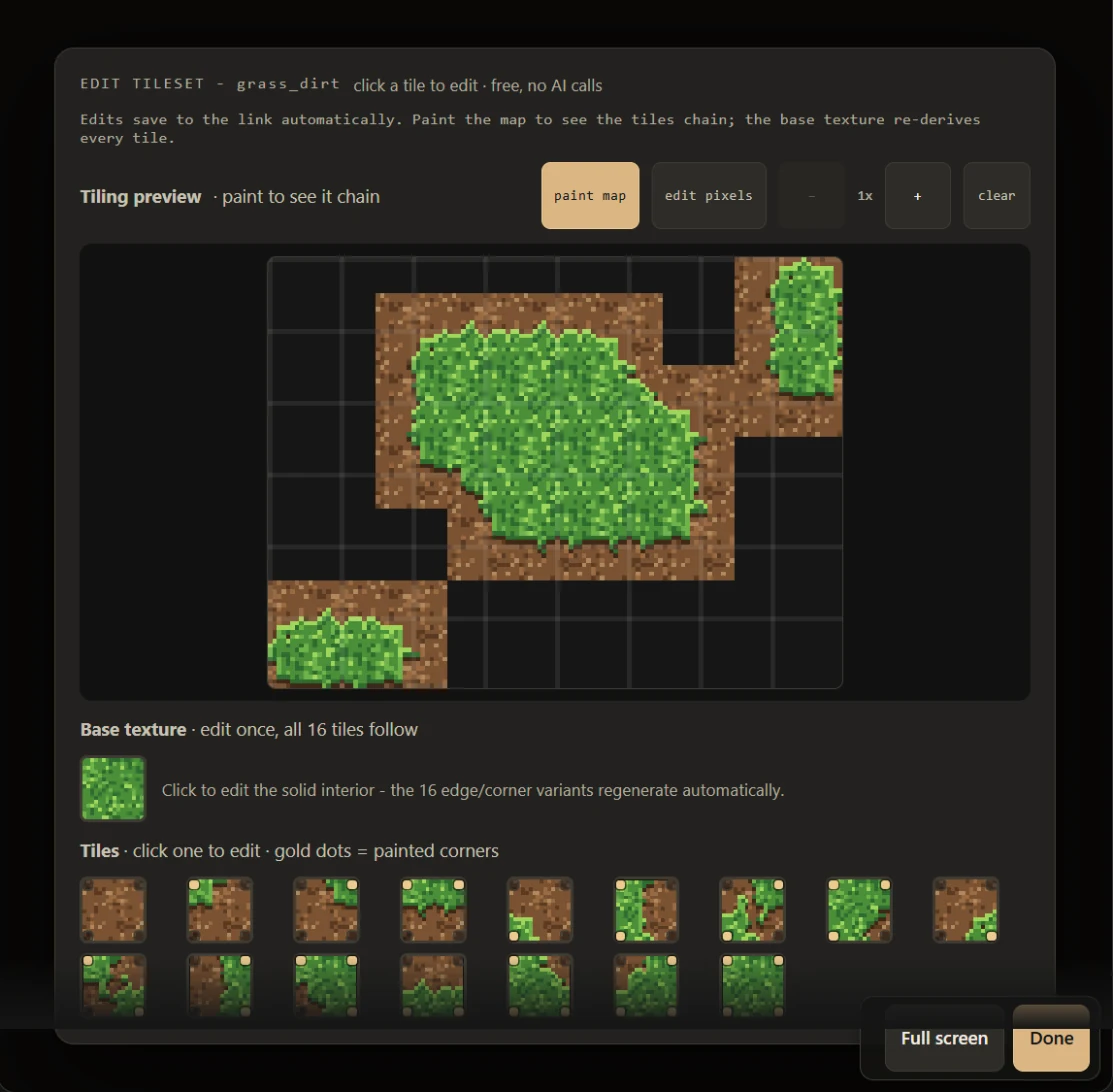
What is still up to the model is that the texture wraps: its right edge has to continue into its left, and its bottom into its top. Grass, water and gravel, with lots of small detail, wrap well. Large rigid features don't. At 16 px, cobblestones failed to line up across the wrap, and rerolling didn't help, which points at a capability limit rather than bad luck.
For a wall sitting on a floor, there is no way around asking the model to match an edge, so the request makes it as easy as possible. The model sees the wall and floor tiles both as images and as letter grids, with their palettes merged and any clashing letters renamed first, and is told that its top row must equal the wall's bottom row letter for letter, and its bottom row the floor's top row. Seeing the rows as letters is what makes the rule possible to follow. In the 16 px research runs this joined wall to floor in every run on both models tested.
What it costs and how long it takes
These are model fees for one single-pass sprite, from a benchmark on 15 October 2026 that ran the production prompt on three subjects per size. Cost is measured tokens at list price; time is the model call alone.
| Tier (medium effort) | 16×16 | 32×32 | 64×64 |
|---|---|---|---|
| Claude Haiku 5.5 | $0.006 · 52 s | $0.016 · 120 s | $0.021 · 163 s |
| Claude Sonnet 5.5 | $0.027 · 20 s | $0.086 · 56 s | $0.178 · 105 s |
| Claude Opus 5.5 | $0.058 · 25 s | $0.200 · 83 s | $0.403 · 156 s |
Effort moves both numbers. At 32 px, Opus on low effort averages $0.099 and 43 seconds, and on high effort $0.284 and 121 seconds. Some notes on reading the table:
- Output dominates. Most of the bill is the grid itself plus the reasoning before it. Input, including the rendered images, is a small share.
- Haiku is the cheapest and, at medium effort, the slowest. Its reasoning length is erratic: one 64 px run used 82,000 output tokens. Haiku calls get the full 128,000-token ceiling for that reason.
- Three runs per cell is thin. Opus on high effort at 64 px ranged from $0.28 to $0.76. Before the token ceilings were raised, the old 32,000-token cap cut off 20 of 135 benchmark runs, 17 of them Haiku.
- Multi-pass recipes cost roughly one sprite per pass. Animations make one call per frame, with the rest pose and the latest frames attached as images.
The studio charges four times the measured mean per generation, with a floor so that a higher effort never costs less than a lower one.
Where it fails
- Intricate creatures. A dragon with wings, four legs, a tail and a head is the clearest failure. Every lever we tried (a parts plan, drawing in layers, more resolution) still gave floating limbs and blob wings. Layers made it worse: parts drawn separately didn't meet. The model is good at simple and medium single objects and poor at inventing coherent anatomy.
- Bigger canvases. Structured subjects like a knight hold up to 64 px, but 16 to 32 is where results are dependable. 64 is also the hard limit everywhere in SpriteForge; above it, diffusion does a competent job and this approach has no edge.
- Variance. Recognisability varies by about 20% between single rolls of the same prompt, more than most prompt wording changes we tested. Rerolling is part of the workflow.
- Animation. Validated at 16 px. Each frame is drawn with the previous ones in view. Asked only to "change the pose", the model makes frames that hardly change; the prompt has to ask outright for big movement, with bodies that squash as they land and stretch as they leap. The model judges we use for sprites are unreliable on animation, so motion is judged by eye.
- Repetition in tilesets. Asking the model for variation tiles was a dead end: the variants differed by 1 to 6% of their pixels, and the repeat stayed obvious.
- Our own measurements. Much of the format research ran on the previous model generation, and the quality checks use other models as blind judges, which compress scores and miss defects. We trust rankings and our eyes more than absolute scores.
Why bother
Because the output can't be anything but pixel art. Every pixel is on the grid and every colour comes from a palette that was chosen, so there is nothing to snap or re-quantise afterwards. The work goes into getting a text model to make good decisions inside those constraints, and most of the gains so far came from unglamorous things: the token format, a careful decoder, and showing the model a picture of what it drew.
This work is also the subject of the author's bachelor's thesis.
If you want to try it on your own prompt, the studio is at spriteforge.tech/create.