A pixel art tileset generator and tileset maker for Godot and Unity
You paint a map with a generated tileset and the seams show. The grass on one tile doesn't carry on into the next, or every tile fades to the same border, so the whole map reads as one stamp printed over and over.
SpriteForge makes tilesets whose edges line up by construction: a 16-tile Wang autotile set, a 49-tile platformer set with slopes, or wall and floor tiles. They drop into Godot and Unity as plain PNG sheets.
What you get
-
A 16-tile Wang autotile set
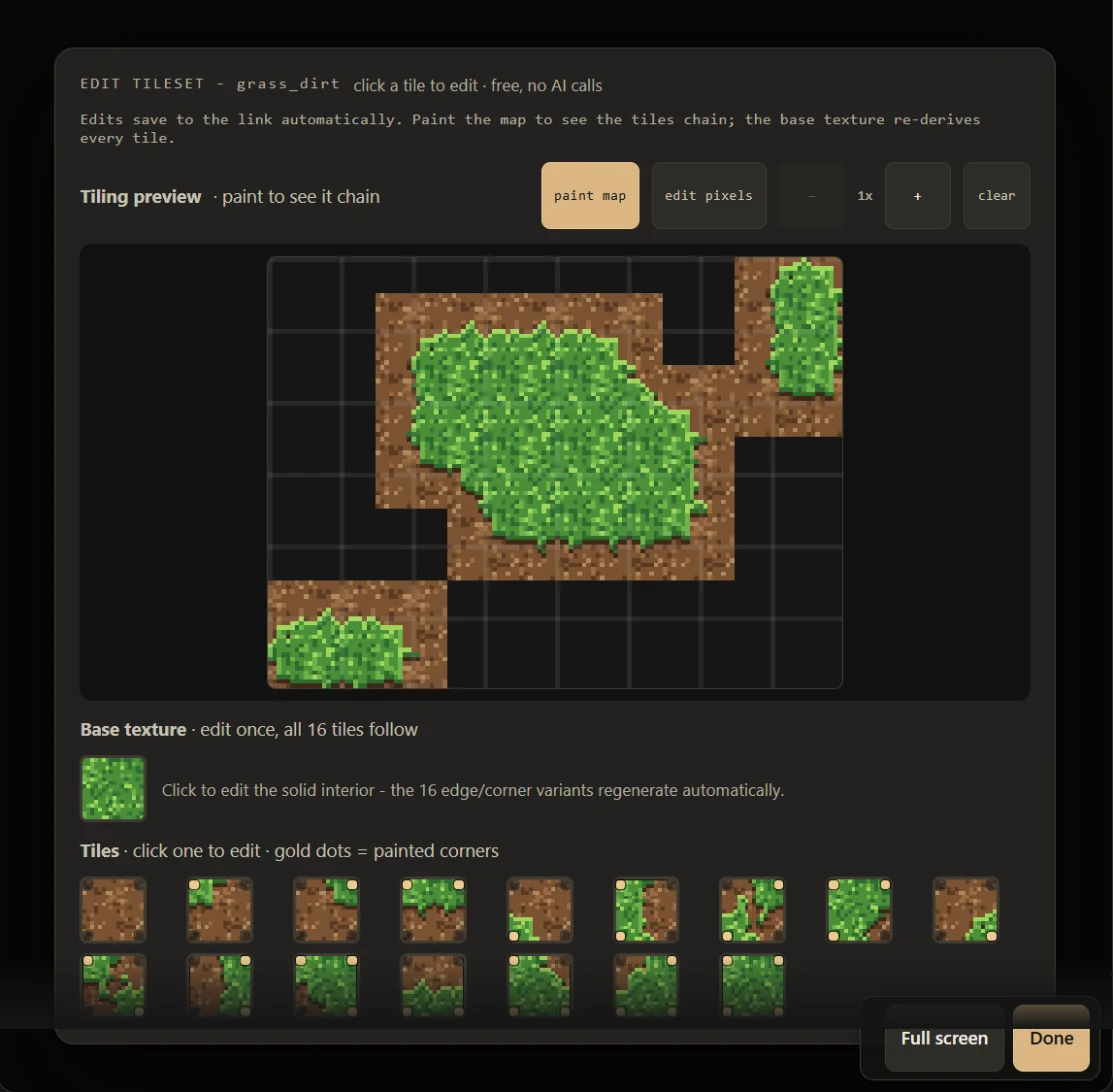
One terrain, such as grass, sand or snow: one tile for every way the four corners of a tile can be filled, so the set tiles on every edge. Each tile's number is its corner mask, the order the engine tutorials below rely on. New sets also come with four variants of the solid middle tile, so a wide field of grass doesn't repeat a single tile.
-
A 49-tile platformer set
Side-view ground for a platformer: a surface like grass over an earth fill, and every edge, corner and slope tile cut from those two fills. The game kit page puts one of these into a playable platformer, with a hero and enemies drawn to fit.
-
Top-down walls and floors
A wall, a floor, and a transition tile that joins them, drawn as one set for dungeons and interiors.
 walltransitionfloor
It also makes small maps where two to six terrains blend into each other. Tiles go from 8 to 64 pixels and are sharpest at 16 and 32, the sizes most 2D games use. Each set is made in the same project as your sprites and can follow its style line and palette, so the ground matches your characters.
Why the edges match
A seamless texture only promises one thing: a tile repeats into itself. A tileset has to do more. Grass has to meet dirt, a corner has to meet an edge, and the pattern has to keep going across all of them.
So SpriteForge doesn't draw sixteen tiles and hope they agree. It draws each terrain once, as a seamless fill, and cuts every edge and corner tile from that same fill. The tiles match because they come from one picture, not because they were drawn to look alike.
The pixels themselves are placed on the grid by a Claude model, from a palette, at the final size. Diffusion-style generators paint a big picture and shrink it, which leaves soft edges and colours nobody picked; here there is nothing to shrink. The tileset generator article lets you paint with a set right on the page, and why AI tilesets don't tile has the longer story.
Use it in Godot 4
- Set Default Texture Filter to Nearest in the project settings, so the tiles stay sharp.
- Add a TileMapLayer with a new TileSet at your tile size, and drag the sheet in.
- Add a Match Corners terrain set and give each tile its corners. A short script does all fifteen.
The full walk-through, with the script and a dual-grid alternative: how to use a Wang tileset in Godot 4.
Use it in Unity
- Import the sheet as Sprite (2D and UI), Multiple, with Point filtering and no compression.
- Slice it as a grid at your tile size, with Keep Empty Rects ticked.
- Paint with a corner-based RuleTile, or with a short dual-grid component.
The full walk-through, with the rule order and the C# code: how to use a Wang tileset in Unity.
Questions
What is a Wang tileset?
A small family of tiles, one for every way a terrain can fill the four corners of a tile: sixteen in all. You paint where the terrain goes and the engine, or a few lines of code, picks the right tile for every cell, so the borders take care of themselves.
Does it work with Godot and Unity?
Yes. The tiles are plain PNG sheets in a fixed order, where a tile's number is its corner mask. In Godot 4 they work with a Match Corners terrain set or a dual grid; in Unity with a RuleTile or a dual grid. There is a step-by-step tutorial for each. Tiled, GameMaker and custom engines take the same sheets.
What tile sizes can it make?
Tiles from 8 to 64 pixels. It is sharpest at 16 and 32 pixels, the sizes most 2D games use.
Can the tiles match my sprites?
Yes. Tilesets are made in the same project as your sprites. Give the project a style line and a palette and you can have each tileset follow them, so the ground, the walls and the characters read as one game.
What does a tileset cost?
You pay per generation from prepaid credits, with no subscription. Sprites start at $0.03, a 16-tile Wang set is one drawing, and the studio shows the exact price before you start. Free credit to start, no card.
Can I edit the tiles by hand?
Yes. The free tileset editor lets you paint a test map, draw on single tiles, or change the base texture, which re-derives every edge tile you haven't drawn by hand. It also works inside Claude and Claude Code.
Is it diffusion?
No. A Claude model places every pixel on the grid from a palette, at the final size. Nothing is drawn large and shrunk, so there are no blurred edges or stray colours to clean up.
Make your first tileset
Open the studio, pick Autotile, and describe the ground: "mossy cobblestone", "snow over dark earth". You see the price before anything is drawn.