Your coding agent builds the game. SpriteForge draws it.
SpriteForge for coding agents · an MCP connector and a Claude Code plugin · updated
A coding agent can write a whole game in an afternoon. Then you run it, and the hero is a coloured rectangle. Or the art is ten free packs that don't match each other.
Add SpriteForge to the agent. It plans the asset list from your game and tells you one price. After your OK it generates a matching kit: hero, enemies, items, tiles and animations.
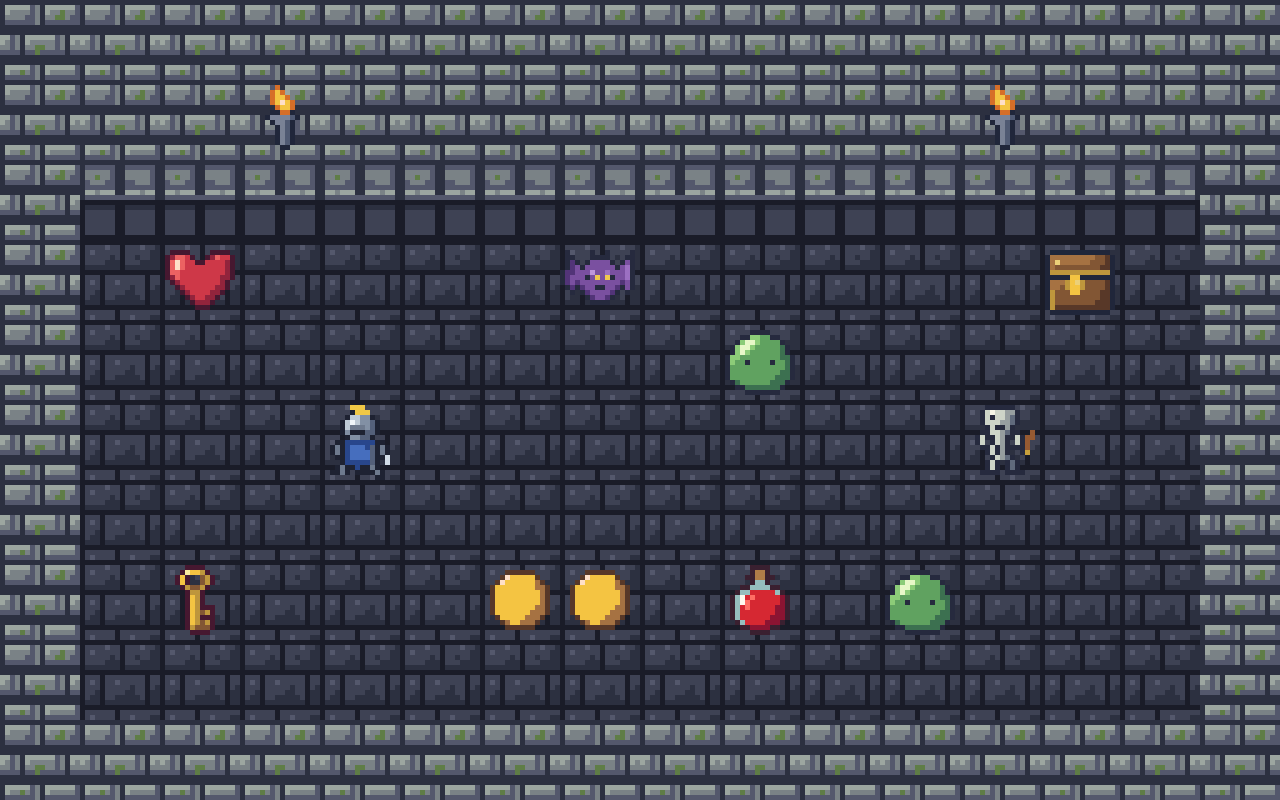
This kit was ordered through the SpriteForge connector from one Claude Code conversation. Here is all of it.
A room assembled from the kit. It is a mock-up, not a running game. Swipe sideways to see all of it.
10 sprites
hero, enemies and items
4 frames
a walk cycle for the hero
3 tiles
wall, transition and floor
16×16
every piece, on the Sonnet tier
$2.20
of credits for all of it
About 3 min
of generation
THE 10 SPRITES · 16×16 EACH, SHOWN LARGER
knight
slime
bat
skeleton
coin
key
potion
chest
torch
heart
WALK CYCLE · 4 FRAMES, ONE SHEET
DUNGEON TILES · ONE SHEET
walltransitionfloor
How the agent kept it matching: it set the project style once, drew the hero first, and used the hero as the style reference for everything else.
What the agent does
You say one sentence. The agent already knows your game, because it wrote the code. From there:
It plans the list. It looks at the game and writes down what needs art: the hero, the enemies, the items, the ground and walls, the animations.
It tells you one price. Every call has a fixed price, so the agent adds them up and shows you the total before anything is spent.
You say OK. Or you cut the list, change the size, or pick a cheaper tier first.
It generates the kit and saves it. In Claude Code the PNGs and sprite sheets go straight into your project folder. In claude.ai you get download links.
Why the kit matches
Ten free packs look like ten different artists. A kit has to look like one. Three things keep it together:
One project style. The agent sets the style and palette on a SpriteForge project once. Every generation in that project follows it.
The hero is the reference. The hero is drawn first, then passed along as the style reference for the enemies, the items and the tiles.
One size. Every piece is made at the same pixel size, so a 16×16 hero stands next to 16×16 enemies on 16×16 tiles.
Why it is real pixel art
Most AI pixel-art tools run an image model. A diffusion model starts from noise, predicts a large picture, and the result is shrunk onto a pixel grid. The shrinking leaves colours nobody picked, soft edges and stray pixels.
SpriteForge doesn't render an image. It asks a Claude model to write the sprite as text: a short palette, each colour named by a letter, and a grid with exactly one letter per pixel at the final size. No diffusion, and nothing is drawn big and shrunk. A 16×16 sprite is born at 16×16, so every pixel is a hard square in a colour from the palette. More on how the pixels are made.
Start in three steps
In Claude Code
Add the plugin. Run these two commands, one after the other.
Sign in. The first time, run /mcp and sign in to SpriteForge. Free credit to start, no card.
Ask for the kit. Open your game's folder and say:
Make the art kit for this game
Or run /spriteforge:kit.
In claude.ai and the Claude desktop app
Open Settings, then Connectors, then Add custom connector. Paste this URL and sign in to SpriteForge when Claude asks. Then say the same sentence.
https://www.spriteforge.tech/mcp
In other MCP clients
The same URL works in clients that support remote MCP servers with OAuth sign-in. Tested in claude.ai and Claude Code. Anything else can use the REST API with an account key.
What it costs
Each call has a fixed price, and you see the total before anything is spent. Failed drawings are refunded. Today's prices for one sprite:
TIER AND SIZE
ONE SPRITE
Haiku, 16×16
3¢
Sonnet, 16×16
12¢
Sonnet, 32×32
41¢
Opus, 32×32
81¢
Two examples:
The 16×16 kit above cost $2.20 on the Sonnet tier.
The same kit at 32×32 on Sonnet is about $7.50 (18 calls at 41¢, plus a cent or two per sprite for the style reference).
Free credit to start, no card. New accounts get it the first time they open the studio while signed in.
What it can make
Single sprites and staged characters.
Sets of up to 8 sprites that share a palette.
Animations of up to 8 frames, as a sprite sheet.
Top-down terrain: wall and floor tiles, like the ones above.
Wang autotile sets of 16 tiles, and platformer ground sets of 49 tiles. The tileset generator page shows them and how they go into Godot and Unity.
Multi-terrain maps.
Sizes go up to 64 px. It is best at 8 to 32 px; 64 px works but is not where it shines.
Honest limits
It is best at 8 to 32 px. Larger art is not what it is for.
It is not instant. A sprite takes from seconds to a few minutes.
It spends credits. Every call costs something, and you see the total first.
You still review the kit. Ask the agent to redraw a sprite you don't like, or fix the pixels by hand in the free editor.
Questions
Does the agent spend my credits without asking?
No. It plans the list, quotes one total for the whole kit and waits for your OK. The one exception is when you give it a budget up front: then it can go ahead inside that budget.
Which coding agents does it work with?
Tested in claude.ai and Claude Code. The connector is a remote MCP server with OAuth sign-in, so the same URL works in clients that support those. Anything else can use the REST API with an account key.
What files do I get, and do they work in my engine?
Plain PNGs and sprite sheets, with a manifest file that lists them. They work with Godot, Unity, Phaser and anything else that loads PNGs. For Wang tilesets there are step-by-step tutorials for Godot 4 and Unity.
Is it diffusion?
No. A Claude model writes each sprite as a grid of palette letters at the final size, one letter per pixel. Nothing is drawn large and shrunk.
Can I edit the sprites by hand?
Yes. The SpriteForge Editor is a free pixel and tileset editor that works inside claude.ai and Claude Code, with no account. You can also ask the agent to redraw a sprite.
Who owns the art?
You own the assets you generate and export. SpriteForge does not claim ownership of your art or resell it. Because the art is produced by third-party AI models, SpriteForge can't guarantee that an output is free of third-party rights, and how you use it is your responsibility. The terms have the full wording.
Give your game its art
Add the plugin, then say: "Make the art kit for this game."